
Decision-making is a fundamental aspect of programming, allowing programs to execute different code paths based on certain conditions. In C++, decision-making is implemented using constructs like if, else, and switch.
The if Statement
The if statement is used to execute a block of code if a specified condition is true. It can be followed by an optional else statement to execute a block of code if the condition is false.
					#include <iostream>

int main() {
    int x = 10;
    if (x > 5) {
        std::cout << "x is greater than 5" << std::endl;
    } else {
        std::cout << "x is not greater than 5" << std::endl;
    }
    return 0;
}
					// output //
x is greater than 5
Explanation:
- In this example, the condition
x > 5is evaluated. - Since
xis 10, which is greater than 5, the code block inside theifstatement is executed.
The else-if Statement
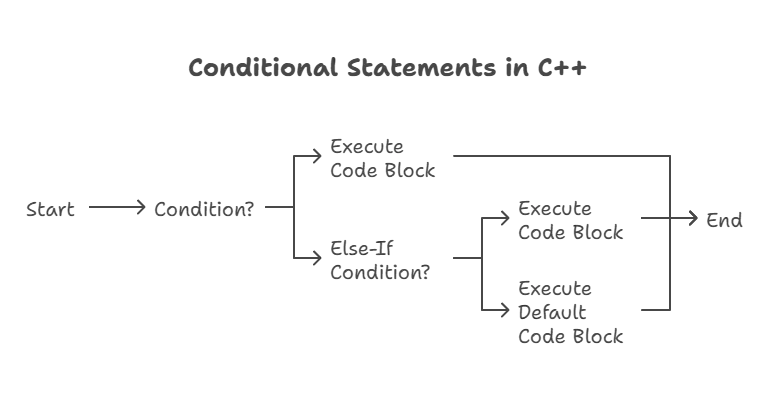
The else-if statement allows for multiple conditions to be checked sequentially after an initial if statement.
					#include <iostream>

int main() {
    int x = 10;
    if (x > 10) {
        std::cout << "x is greater than 10" << std::endl;
    } else if (x < 10) {
        std::cout << "x is less than 10" << std::endl;
    } else {
        std::cout << "x is equal to 10" << std::endl;
    }
    return 0;
}
					// output //
x is equal to 10
Explanation:
- The condition
x > 10is false, so the program checks the next condition. - The condition
x < 10is also false, so the program executes the code block inside theelsestatement.
Nested if Statements
You can nest if statements within other if or else statements to create more complex decision-making structures.
					#include <iostream>

int main() {
    int x = 10;
    if (x >= 0) {
        if (x % 2 == 0) {
            std::cout << "x is a positive even number" << std::endl;
        } else {
            std::cout << "x is a positive odd number" << std::endl;
        }
    } else {
        std::cout << "x is negative" << std::endl;
    }
    return 0;
}
					// output //
x is a positive even number
Explanation:
- The outer
ifstatement checks ifxis non-negative. - If
xis non-negative, the innerifstatement checks if it is even or odd.
The else-if Ladder
The else-if ladder allows for multiple conditions to be checked sequentially after an initial if statement. It provides a structured way to handle multiple possible outcomes based on different conditions.
					#include <iostream>

int main() {
    int x = 10;
    if (x > 10) {
        std::cout << "x is greater than 10" << std::endl;
    } else if (x < 10) {
        std::cout << "x is less than 10" << std::endl;
    } else {
        std::cout << "x is equal to 10" << std::endl;
    }
    return 0;
}
					// output //
x is equal to 10
Explanation:
- The condition
x > 10is false, so the program checks the next condition. - The condition
x < 10is also false, so the program executes the code block inside theelsestatement. - The else-if ladder provides a structured approach to handling multiple conditions in a sequential manner. Each condition is evaluated only if the previous condition(s) are false, ensuring that only one code block is executed based on the first true condition encountered.
The switch Statement
The switch statement in C++ provides a convenient way to perform multi-way branching based on the value of an expression. It allows you to execute different code blocks depending on the value of a variable or an expression.
					switch (expression) {
    case value1:
        // code block for value1
        break;
    case value2:
        // code block for value2
        break;
    // more case statements
    default:
        // default code block
}
expression: A variable or an expression whose value is to be compared with the values specified in thecaselabels.value1,value2, etc.: Constants or integer values against which theexpressionis compared.case: Label specifying a particular value to match.default: Optional label specifying the code block to execute if nocaselabel matches theexpression.break: Keyword used to exit theswitchstatement after executing a code block.
					#include <iostream>

int main() {
    int choice;
    std::cout << "Enter a number (1-3): ";
    std::cin >> choice;

    switch (choice) {
        case 1:
            std::cout << "You chose option 1" << std::endl;
            break;
        case 2:
            std::cout << "You chose option 2" << std::endl;
            break;
        case 3:
            std::cout << "You chose option 3" << std::endl;
            break;
        default:
            std::cout << "Invalid choice" << std::endl;
    }

    return 0;
}
					// output //
Enter a number (1-3): 2
You chose option 2
Explanation:
- The user is prompted to enter a number.
- The value entered by the user is stored in the
choicevariable. - The
switchstatement evaluates the value ofchoice. - If
choicematches any of thecaselabels (1, 2, or 3), the corresponding code block is executed. - If no
caselabel matches the value ofchoice, the code block under thedefaultlabel is executed. - The
breakstatement is used to exit theswitchstatement after executing the corresponding code block, preventing fall-through to subsequentcaselabels.
Key Points:
- The
switchstatement provides a concise and readable way to handle multiple possible outcomes based on the value of an expression. - Each
caselabel must be followed by abreakstatement to prevent fall-through to subsequentcaselabels.
Decision-making constructs such as if, else, and switch are essential tools in C++ programming for controlling the flow of execution based on conditions. By understanding how to use these constructs effectively, you can write more versatile and dynamic programs to meet various requirements.Happy coding! ❤️